Monitoring SAP HANA Deprecated Features with Zabbix
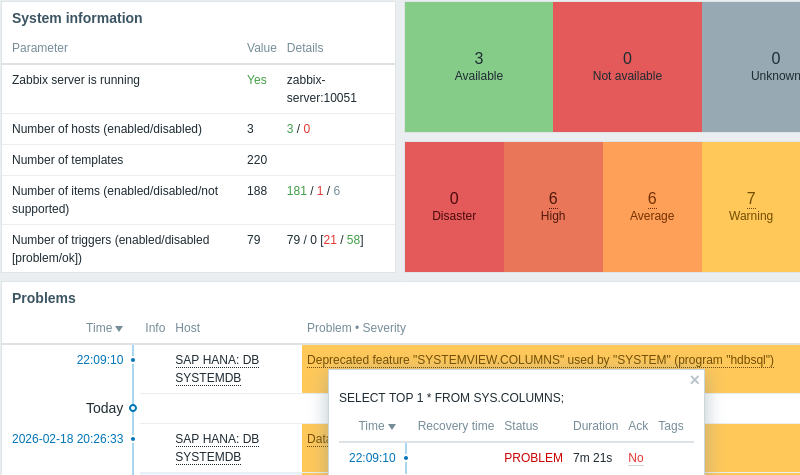
As systems evolve, certain features and parameters are phased out in favor of more efficient alternatives. Ignoring these aging features today can lead to significant headaches during your next major upgrade. To get ahead of this, I recently expanded my Zabbix Agent2 plugin for SAP HANA to include a dedicated check that proactively identifies the usage of these “deprecated” features.
The Challenge of Modernization
In a complex SAP landscape, it is rarely obvious when a legacy feature is still in use. Developers might be using old syntax, or legacy applications might be hitting outdated views. Manually auditing these instances is a chore that most Basis teams simply don’t have time for.
The goal for this new check was simple: provide an automated, “set-it-and-forget-it” way to surface these risks directly within the Zabbix dashboard.
Dynamic Detection via Low-Level Discovery (LLD)
The core of this implementation relies on Low-Level Discovery (LLD). Since every SAP HANA environment is unique, we can’t simply hardcode a list of things to look for. Instead, the plugin queries the system to see which specific deprecated components are actually being triggered. Then, by leveraging Zabbix’s LLD mechanism, the plugin dynamically creates items for each unique deprecated feature it finds. This means:
- Automatic Scaling: When a new deprecated feature is used, Zabbix discovers it and begins monitoring it without any manual configuration.
- Context Tracking: Rather than getting a generic “legacy usage detected” alert, you can see exactly which feature is the culprit, who used it, when it was last seen and the specific query involved.
- Auto-Cleanup: If a feature is no longer being used, the discovery process eventually cleans up the stale items, keeping your monitoring environment tidy.
Furthermore, thanks to the existing low-level discovery of Tenant databases, this logic is automatically applied across every tenant in your environment.
How to Get This
To implement this functionality, I’ve added new logic to the Golang plugin and refreshed the XML template. You can grab the update for zabbix-agent2-plugin-saphana via your system’s package manager. Once updated, simply import the latest version of the monitoring template from the links on the getting started page and you’re good to go.